Native macOS cloud player

The cloud music player for Mac

Oort plays your entire music collection straight from the cloud — Dropbox, OneDrive, iCloud Drive, or local folders — in one fast, native Mac app. No re-uploading, no duplicating, no subscription.

Start your 14-day free trial How it works

$9.99 once. Yours forever — no subscription.

Works with Dropbox · OneDrive · iCloud Drive · Local files
Oort cloud music player for Mac streaming a library from Dropbox, OneDrive and iCloud Drive

Your music lives in the cloud. Now it plays like it's on your Mac.

Most Mac music apps assume your library is sitting on your internal drive. That stopped being true years ago — collections outgrew laptop SSDs and moved to Dropbox, OneDrive, and iCloud Drive. The problem is that a folder full of FLAC and MP3 files in the cloud isn't a music player. You get files, not a library: no album art, no gapless playback, no proper browsing.

Oort is the cloud music player that fixes that. It connects to the storage you already pay for, reads your tracks and tags, and turns them into a real, browsable library — art, albums, artists, playlists, search — all playing on demand from the cloud. Nothing is re-uploaded to anyone's servers, because Oort doesn't have any. Your files stay exactly where they are.

Play from any cloud — or all of them at once

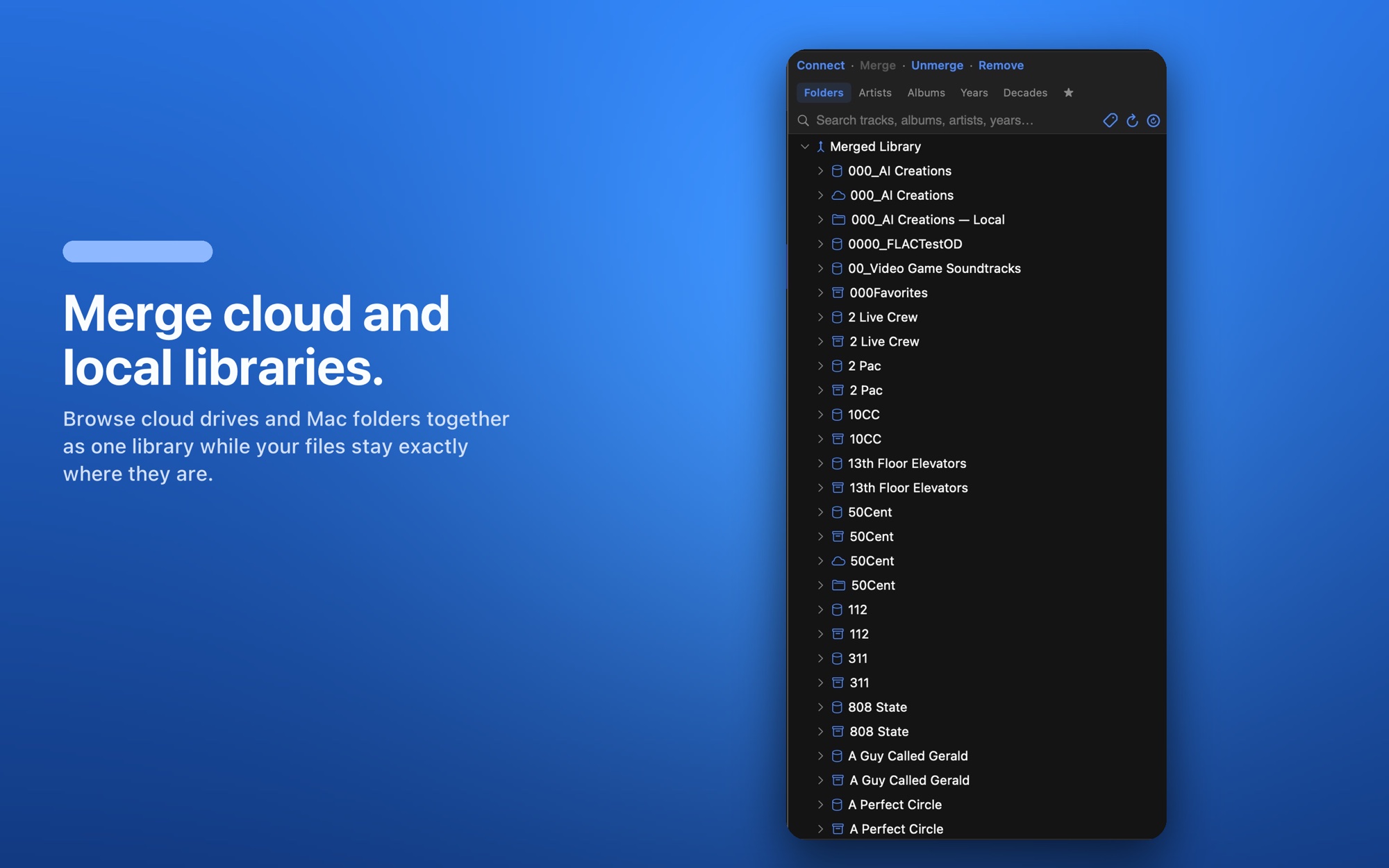
Oort doesn't lock you into one provider. Connect as many sources as you like and it merges them into a single library you can browse and search as one:

Oort merging Dropbox, OneDrive, iCloud Drive and local folders into one Mac music library

Cloud-sized storage, local-app speed

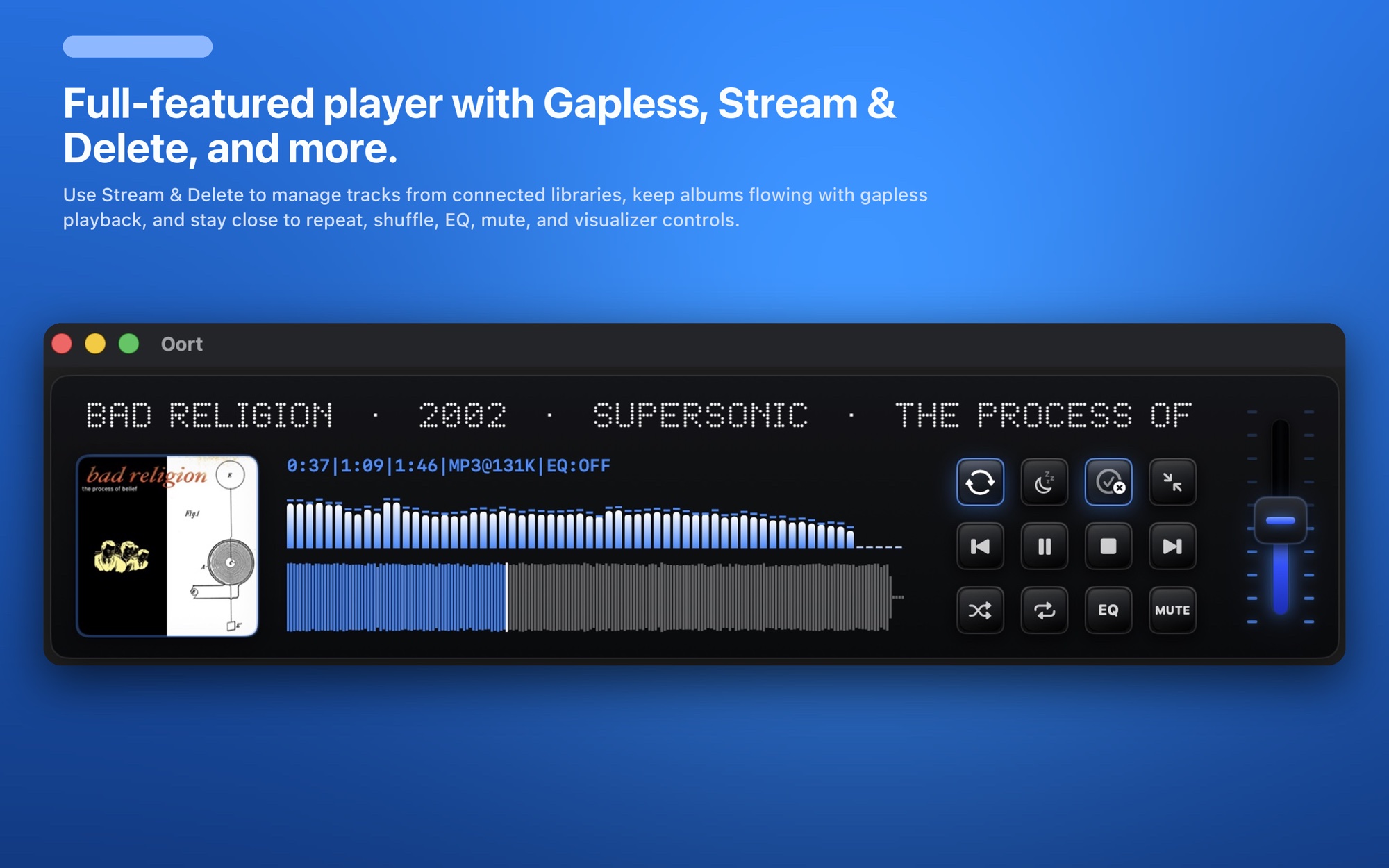
Streaming from the cloud usually means waiting. Oort is built to feel instant: it streams tracks on demand, caches what you play, and prefetches the next track so albums play gapless, with no silence between songs. It stays quick and light even with libraries of tens of thousands of tracks, because it's written in Swift as a genuinely native Mac app — not an Electron web wrapper.

You don't have to download your entire collection to disk just to listen to it, and you don't have to give up the polish of a desktop-class player to get cloud-sized storage. You get both.

A real player, not a file browser

Lossless matters here too — Oort plays FLAC, ALAC, AAC, and MP3, so your high-resolution files sound the way they should.
Why a native cloud player beats a sync folder

☁️

No re-uploads

Your library stays in your own accounts. Oort connects and plays — it never copies your music to a third-party service.

💾

No full download

Stream on demand and cache what you play. Keep a huge library without filling your Mac's drive.

⚡️

Native speed

Swift-built for macOS — fast to launch and smooth across tens of thousands of tracks.

🎚️

Gapless + EQ

Desktop-class playback: gapless transitions and a full 8-band parametric EQ.

🔒

Private by design

No accounts to create, no ads, no tracking. Sign in to your cloud and you're done.

💜

Buy once

$9.99 one time, with a 14-day free trial. No subscription, ever.

Every feature Oort ships with

One native app — here's everything it does.

Your library, from anywhere

  • Connect Dropbox, OneDrive, iCloud Drive, and local folders
  • Merge every source into one library — files stay in place, never re-uploaded
  • Add or remove any source anytime
  • Browse by Folders, Artists, Albums, Years, Decades, and Favorites
  • Fast search across every connected source at once

Every format, played right

  • Lossless FLAC and ALAC at full quality
  • AAC, MP3, M4A, WAV, AIFF, and CAF
  • Your lossless stays lossless — no re-encoding

Playback built for albums

  • Gapless playback with next-track prefetch — no silence between songs
  • Shuffle across everything or within the current album
  • Repeat all, one track, or the current album
  • Sleep timer with presets or a custom time
  • Play queue — add to queue, play next, or replace
  • Saved playlists, always one click away
  • Smart priority: an active playlist plays first, then your queue, then the library resumes

Sound shaping

  • 8-band parametric EQ
  • Per-band filter type, frequency, gain, and Q
  • Tune the sound to your headphones or room — source files are never touched

Stream & Discard

  • Streams tracks on demand and caches what you play
  • Optional Stream & Discard mode keeps only the current and next track and deletes the rest
  • Play a cloud-sized library while leaving almost nothing on your Mac's drive

A tidy, self-organizing library

  • Album art and clean metadata pulled in automatically
  • Background metadata fill tags your whole library as you listen
  • Two refreshes: Update Filters (fast rebuild) or Full Rescan (re-walk the cloud)
  • Favorite (♥) any track and browse a dedicated Favorites view

Visuals & interface

  • Three audio-reactive visualizers — Acid Trip, Synthwave, and Arcade Cabinet
  • Each opens in its own resizable window that remembers size and position
  • Compact mini-player keeps playback, gapless, and EQ a click away

Native, private, yours

  • Swift-native macOS — fast and light across tens of thousands of tracks
  • No accounts, no tracking, no ads — sign in to your own cloud and you're done
  • One-time $9.99 with a 14-day free trial and Restore Purchases
  • Free updates — native iPad and iPhone versions on the way

One price. No subscription. Ever.

Try every feature free for 14 days. Unlock it once and it's yours for good.

Lifetime license
$9.99
one-time · 14-day free trial
  • Unlimited library from Dropbox, OneDrive, iCloud & local
  • 8-band parametric EQ & audio-reactive visualizers
  • Gapless playback & FLAC / ALAC / AAC / MP3 support
  • Free updates · no subscription, no ads
Download on the App Store

14-day free trial, then a one-time $9.99 unlock — on the App Store.

Cloud music player FAQ

What is a cloud music player?

A cloud music player plays your music files directly from cloud storage — like Dropbox, OneDrive, or iCloud Drive — instead of requiring you to keep every track on your Mac's internal drive. Oort connects to your accounts and streams from them, so your library lives in the cloud and plays on your Mac.

Does Oort work with more than one cloud at a time?

Yes. Oort can connect Dropbox, OneDrive, iCloud Drive, and local folders at the same time and merge them into one browsable, searchable library — while every file stays exactly where it is.

Does streaming from the cloud use a lot of data or storage?

Oort streams tracks on demand and caches what you play, so you're not forced to download your entire library to disk. You get cloud-sized storage with local-app speed.

Is there a subscription for the cloud player?

No. Oort is a one-time $9.99 purchase with a 14-day free trial. There's no monthly fee, no ads, and no account to create beyond signing in to your own cloud.

Explore Oort

Dropbox music player for Mac →

Stream your Dropbox library without syncing it to disk.

OneDrive music player for Mac →

Play OneDrive and Microsoft 365 music natively.

FLAC player for Mac →

Lossless FLAC and ALAC, from the cloud or local.

Winamp for Mac →

The spirit of Winamp — EQ, visualizers, mini-player.

foobar2000 alternative for Mac →

Lightweight, fast, folder-friendly, huge libraries.

Oort overview →

Everything the native Mac music player does.

Hear your whole cloud library again.

Start the free trial today — your music is already where it needs to be.

Start your 14-day free trial